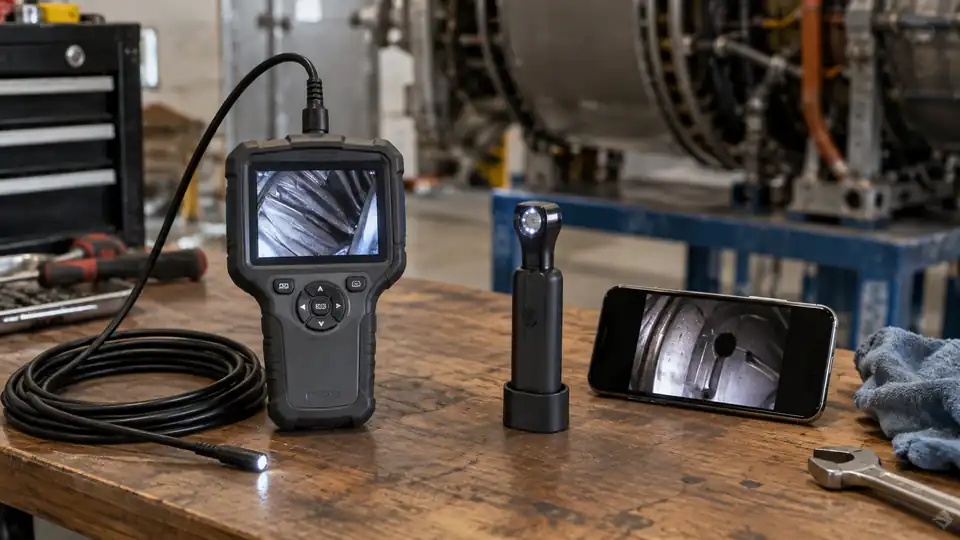
Choosing between a wired and wireless borescope usually comes down to one practical question: where will the screen sit while the probe is inside the inspection area? A wired inspection camera keeps the display or phone physically connected to the camera, while a wireless model sends the live image over a short-range connection, commonly Wi-Fi. Both can reveal a spark-plug opening, wall cavity, drain, or duct, but they behave very differently once your hands are busy and the access point is awkward.
Wired vs. Wireless Borescope at a Glance
| Factor | Wired borescope | Wireless borescope |
|---|---|---|
| Connection | Uses a physical cable between the camera and display or mobile device | Sends the image wirelessly to a phone, tablet, or dedicated receiver |
| Setup | Usually straightforward, with fewer wireless pairing steps | May require an app, Wi-Fi connection, permissions, and device pairing |
| Movement | The connected display can tug or limit positioning | The screen can stay in a more convenient location while the probe is guided |
| Reliability | Less affected by wireless interference | Can be affected by range, obstructions, network settings, or device compatibility |
| Power | May draw power from the connected device or use its own battery | Usually requires power for the camera transmitter and the receiving device |
| Best fit | Quick, close inspections and users who prefer simple operation | Awkward access points, two-handed probe control, and easier screen placement |
How a Wired Borescope Works
A wired borescope sends video through a physical connection. Some models have a built-in screen attached to the probe handle, while others connect to a phone, tablet, or computer through a cable. The exact connector matters. A USB-C plug may fit a device physically without guaranteeing that the operating system, app, or camera hardware will communicate correctly.
For a quick automotive check, a wired unit can be refreshingly direct. You connect the camera, switch it on, and guide the probe through a suitable access point while watching the screen in your hand. There is no wireless network to select and no app connection to troubleshoot, which can save time beside a vehicle or workbench.
The cable can become a nuisance in tighter spaces. Imagine reaching behind an appliance while the phone hangs from the inspection camera cable, or trying to hold a display beside a drain opening while feeding the probe forward. That physical connection may pull against your hands, snag on nearby parts, or force the screen into an awkward viewing position.
Strengths of a Wired Model
- Simple connection with fewer pairing steps.
- Usually less affected by wireless congestion or signal obstruction.
- No separate wireless transmitter connection to maintain.
- Convenient for short inspections near the display or phone.
- Often a sensible choice for basic automotive, appliance, and home inspections.
A wired design also makes sense if the inspection area is close to a large monitor or laptop. For example, someone checking a narrow machine opening at a bench can keep the screen beside the work surface, while a homeowner examining a shallow wall cavity may value immediate plug-in operation more than remote viewing.
How a Wireless Borescope Works
A wireless borescope still has a probe cable. Wireless describes the link between the camera unit and the viewing device, not a cable-free camera head. The probe connects to a small transmitter or handle, and that unit sends the live image to a phone, tablet, or included receiver.
This arrangement gives the screen more freedom. While feeding a probe behind a refrigerator, inside an attic opening, or through an engine access point, you can place the phone on a nearby surface instead of carrying it with the camera. One hand can guide the cable while the other steadies or adjusts the probe, which often feels far less cramped.
Wireless operation introduces another layer between the camera and the image. The mobile device may need the correct app, permissions, wireless connection, and operating-system support. A phone can also switch networks or disconnect when its settings change, so compatibility should be checked before purchase rather than assumed from the presence of Wi-Fi.
Strengths of a Wireless Model
- Lets you position the screen away from the probe handle.
- Can make two-handed inspections easier.
- Useful where a physical display cable would snag or restrict movement.
- May allow convenient image and video storage on a mobile device.
- Works well for access points spread across a room, vehicle, or work area.
Wireless viewing is especially handy for a wall cavity or ceiling space. You can leave the phone at eye level while guiding the probe several feet away, then glance back at the screen without twisting your wrist toward the opening. In a vehicle, the same separation can help when the access point sits low or deep inside the engine bay.
Image Delay, Range, and Interference
A wired connection generally has a shorter path between the camera and screen, which can make the live view feel immediate. That response helps while steering a flexible probe around a bend, because a small delay can make the camera overshoot the area you are trying to frame. The actual experience still depends on the camera, display, connection, and image processing.
Wireless models may show a slight delay or occasional interruption if the signal is blocked by equipment, walls, metal parts, or distance. A phone inside a pocket or behind a vehicle panel may also receive a weaker signal than one placed nearby. For a simple visual check, a brief interruption may be harmless. While guiding a probe through a tight path, it can become frustrating quickly.
Range claims should be treated as operating guidance rather than a guarantee for every inspection. A clear open space behaves differently from a crowded workshop, a metal cabinet, an engine compartment, or a duct surrounded by building materials. If wireless reliability matters, keep the receiving device reasonably close and avoid placing the transmitter behind large conductive objects.
Which Type Fits Common Inspection Jobs?
| Inspection task | Usually better suited | Reason |
|---|---|---|
| Checking a spark-plug opening | Either | A wired screen is simple, while wireless viewing can keep the phone out of the engine bay |
| Looking behind an appliance | Wireless | The screen can remain in front of you while the probe reaches behind the unit |
| Inspecting a shallow wall cavity | Either | The better choice depends on access distance and whether a phone connection is convenient |
| Following a long pipe or duct path | Wireless, in suitable range | Remote screen placement can reduce cable tangles around the access point |
| Quick bench inspection | Wired | Direct connection usually keeps setup and handling simple |
| Work in an area with heavy wireless obstruction | Wired | A physical connection avoids dependence on wireless signal quality |
Neither format automatically produces a better inspection image. Focus, working distance, camera stability, lighting, lens cleanliness, surface reflectivity, and display quality all affect what you can see. A wireless camera aimed too close at shiny metal may produce glare, while a wired camera at a better angle may reveal more useful surface detail.
What to Check Before Choosing
Start with the physical layout of the job. If the inspection opening and viewing position are close together, a wired borescope may be the least complicated option. If the screen needs to stay on a dashboard, workbench, floor, or ladder platform while the probe travels elsewhere, wireless viewing may make handling easier.
Next, check the complete connection path. For a wired model, confirm connector type, device support, app requirements, and whether the phone supplies enough power. For a wireless model, confirm that the intended phone or tablet supports the required app and wireless connection. Physical fit alone does not establish compatibility.
Probe behavior still matters more than the connection label. A flexible cable can bend without offering active directional control, while a semi-rigid probe may hold a manually shaped curve. An articulating probe provides controlled camera direction through its mechanism. Wireless transmission does not add articulation, and a wired connection does not remove it.
Also check whether the camera unit, connector, and display share the same environmental limits. A water-resistant probe does not automatically make the transmitter, screen, or connector suitable for immersion, hot equipment, fuel, oil, or cleaning chemicals. For automotive or home work, inspect equipment that is switched off and within the camera’s stated operating conditions.
The Practical Choice
Choose a wired borescope if direct setup, dependable connection, and short-range work matter most. It is a strong fit for bench inspections, basic automotive checks, and situations where the screen can stay beside the access point without getting in your way.
Choose a wireless borescope if screen placement and freedom of movement matter more than the simplest connection. It can be especially useful behind appliances, inside wall or ceiling openings, and around awkward vehicle access points, provided the phone, app, wireless signal, and battery arrangement suit the job.
The best answer in a Wired vs. Wireless Borescope comparison is therefore tied to the inspection layout. Picture the probe entering the opening, then ask where your hands, screen, and cable need to be. That small bit of planning usually reveals which connection type will make the inspection calmer, clearer, and easier to control.
